



Identifier and Research Profile
Guide: Author Identifier – Scopus
The Author Identifier is a unique identifier that links your author profile to your publications and works indexed in the Scopus database. It allows you to:
- Manage identity issues.
- Ensure your publications are correctly attributed.
- Obtain authorship metrics from Scopus.

IQS Library
Recommendations
- Keep your Scopus profile up to date with your correct publications and affiliations.
- Ensure that your ORCID identifier is linked.
- Check regularly for any duplicate profiles.
- Confirm that your Scopus Author Identifier is correctly registered in your MERIT profile, as this is necessary to ensure the correct import of publications and the calculation of metrics.
- Use impact metrics critically and responsibly.
Basic knowledge
How is your profile created?
- It is generated automatically.
- It uses your name as it appears in the publications.
- It is linked to the institutional affiliation shown in the articles.
What should you do?
- Log in to Scopus using your IQS credentials.
- Check and update your profile if you haven’t already done so.
- Add publications (see Edit your profile information).
- Merge any duplicate profiles, especially if:
- You have published under different versions of your name.
- You have more than one account.
- (See Merge duplicate profiles).
- Search for yourself in the Authors search bar.
- Click on your profile and select Edit profile.
- Once on the page, you can do the following to edit your profile:
Update your preferred name and affiliation
- Use the drop-down menus to select which name and preferred affiliation you wish to display on your profile.
- Follow the steps to complete your application.
- You will receive confirmation of your application via email, and Scopus will review and apply the changes within a few days.
Add new publications to your Scopus profile
- Expand the Documents section and, at the bottom of the list, click on Search for missing documents to search for publications indexed in the database.
- Find the publication you wish to add, select it and click on Confirm Author.
- Follow the steps to submit the changes and complete your request.
- Once the request has been submitted, you will receive a follow-up message in your email and, following review by Scopus, the requested changes will be applied.
Remove publications from your Scopus profile
- Expand the Documents section and find the publication you want to delete.
- Click Remove from profile.
To merge two or more duplicate records, follow these steps:
- Log in to Scopus and use the Authors tab to search for yourself.
- Select the duplicate records and click on Request to merge authors.
- Follow the steps in the Author Feedback Wizard, adding or rejecting publications and selecting your current affiliation.
- Submit the request. You will receive an email notification informing you of the changes. Scopus will review the request and apply the changes within the next few days.
Actualiza tu nuevo Author Identifier de Scopus en MERIT
- Once the profiles have been merged, log in to MERIT.
- Select Edit Profile.
- On the Metadata > Personal Identification > ID section.
- Update the ID Type to: Scopus Author ID.
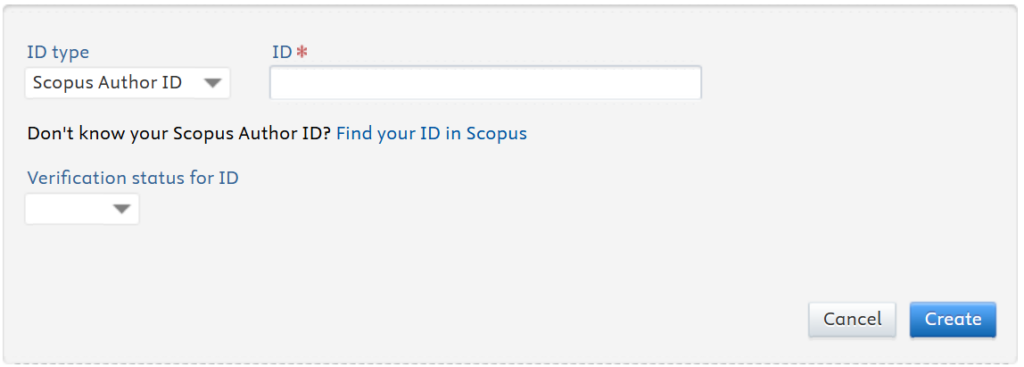
- Click on Save.
At the top, the key metrics are displayed: H-index, total number of citations received and total number of documents.
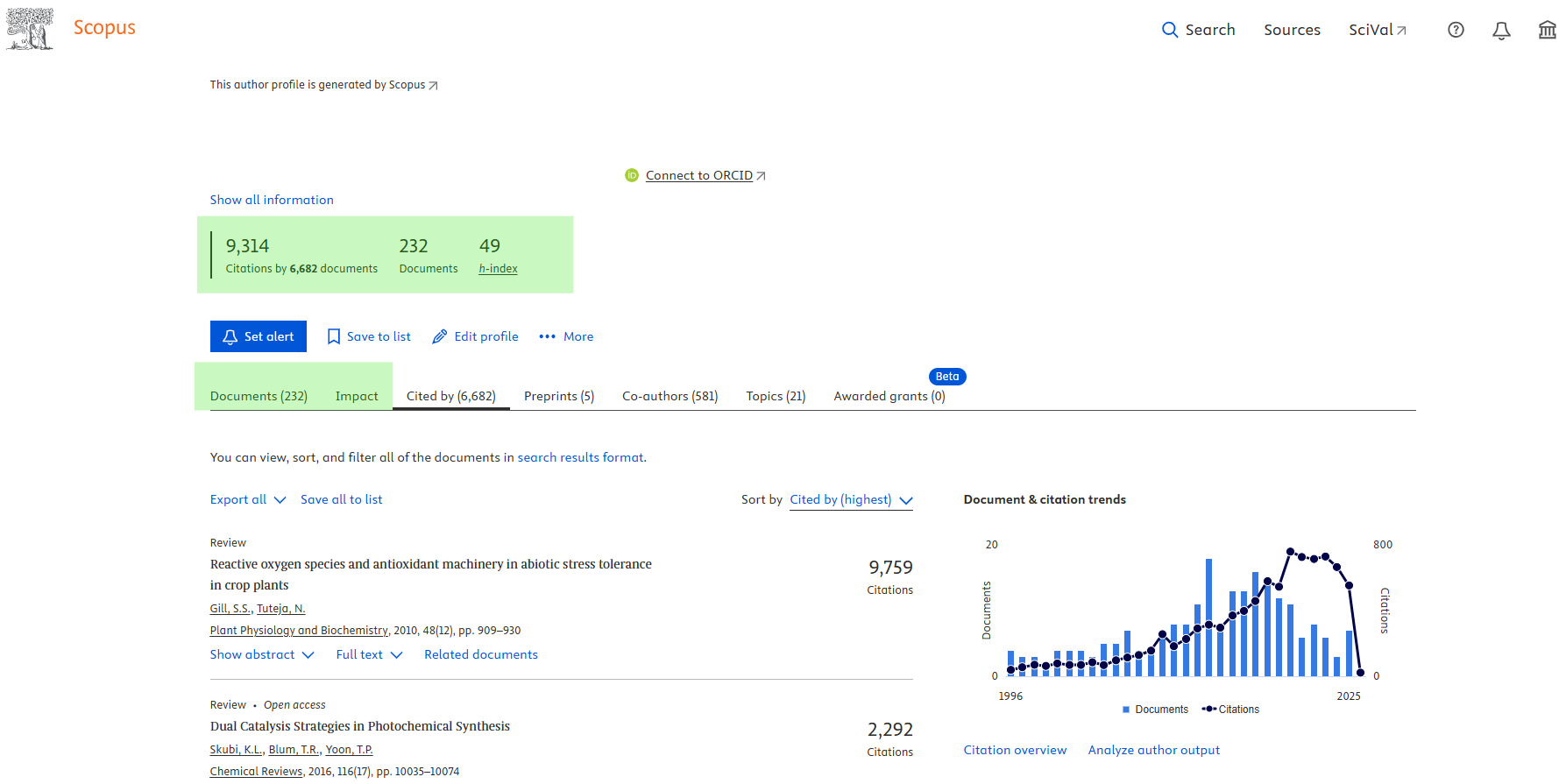
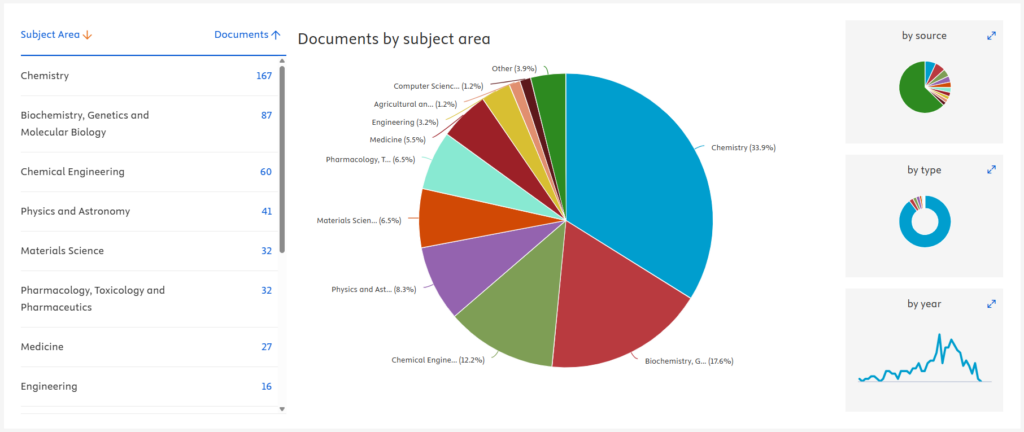
- On the Documents tab, you can view the trend in the number of citations (on the right-hand side) and expand this view using the Citation overview option. You can also analyse your publications in more detail using the Analyse author outputs option to obtain information on the topics covered, the types of documents, or the main journals.
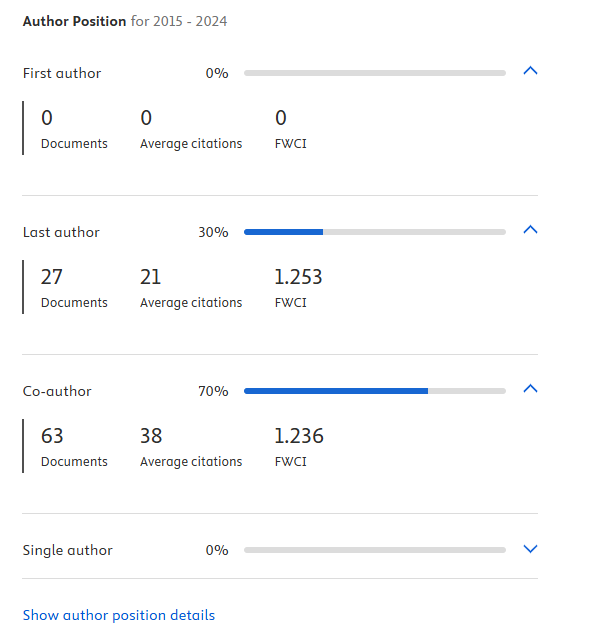
- On the same Documents tab, you can also view, under the Show author position details option, the percentage and number of publications in which you are the first author, last author, co-author and sole author. This is accompanied by an average number of citations received and the FWCI.
- The Impact tab contains further impact metrics:
- Number of publications addressing different Sustainable Development Goals.
- Documents in the highest citation percentiles.
- Documents in the top 25% of journals according to CiteScore, SNIP and SJR.
- Documents and Field-Weighted Citation Impact (FWCI).
FECYT offers online training on the Scopus researcher profile.
Guides and other resources
Contact us
If you have any questions about how to standardise your signature, manage identifiers such as ORCID, or update your profile in academic databases, please feel free to contact us.